
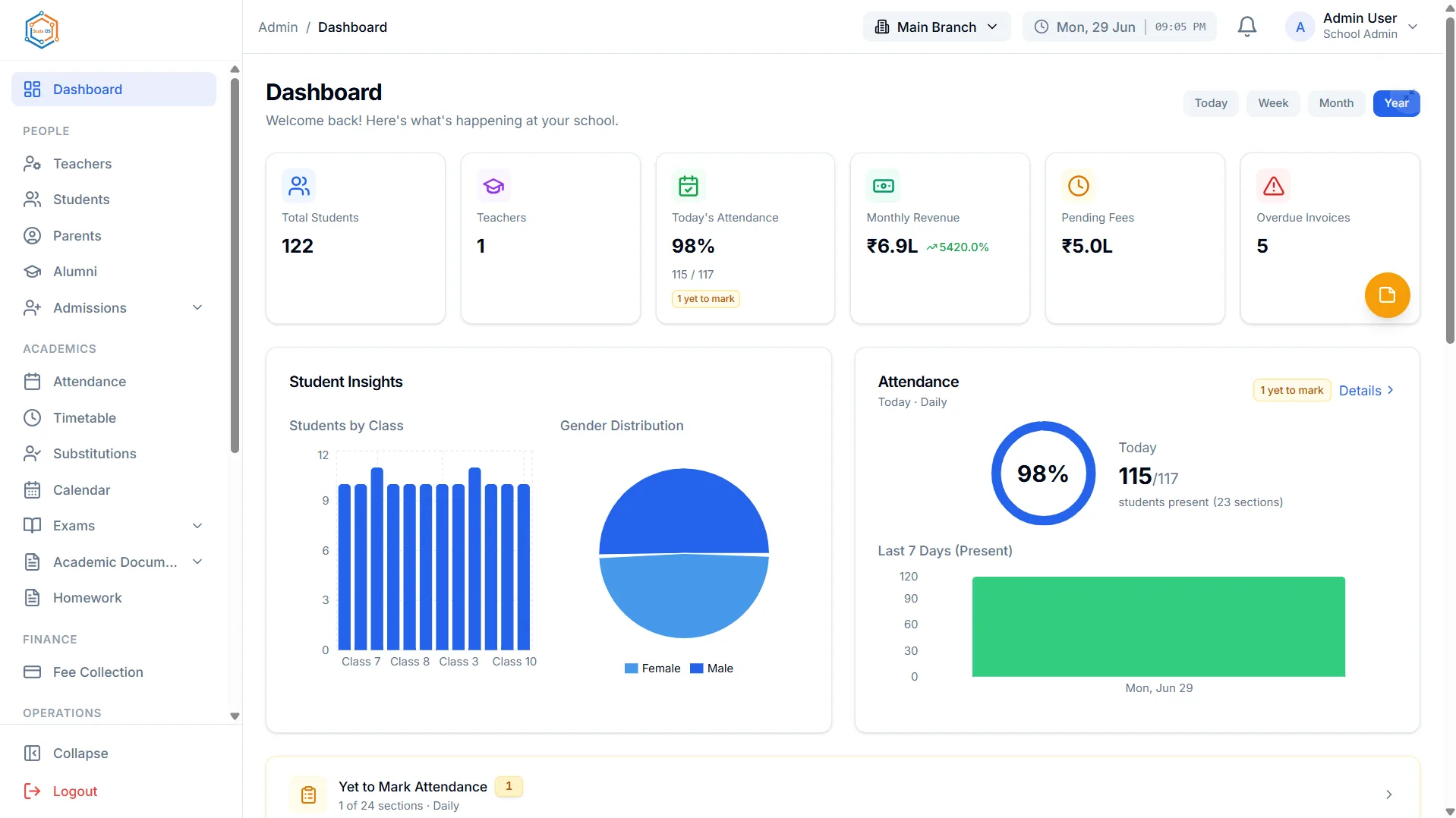
A school management system is the software a school runs on: one place holding students, staff, fees, attendance, exams and communication, used by the office, the staff room, and, if it is any good, by parents and students directly.
That definition is easy. What makes the category hard to evaluate is that almost every product matches it on paper, and they differ enormously in the one dimension nobody puts on a feature list: how many people it was actually designed for.
Four audiences, one system
This is the useful way to think about the category, and it is the thing feature comparisons miss.
A school management system has four kinds of user with genuinely different needs:
The administrator wants control and completeness. Records that are correct, processes that are followed, numbers that reconcile, and the ability to answer a question without asking three people.
The teacher wants speed and to be left alone. Marking a register, entering marks, setting homework. Every extra click here is multiplied by every teacher every day, and a system that is tedious in the staff room gets worked around within a term.
The parent wants answers without asking. Fee dues, attendance, results, what is happening next week. Most parent contact with a school office is a request for information that already exists somewhere.
The student wants their own timetable, homework and results, and increasingly the learning material itself.
Most products in this category were built for the first audience and retrofitted for the other three. You can spot it quickly: the admin screens are dense and capable, the teacher screens are the admin screens with buttons hidden, and the parent view is a read-only page bolted on afterwards.
That matters because a system only tells you the truth if the people closest to the data keep it current. If marking a register is slow, registers are marked in batches at the end of the week, and every attendance figure in the school becomes retrospective.
What it covers
The scope varies, but a reasonably complete platform touches most of this.
The student record and academics
- Student records, with guardians, documents and history
- Admissions, from enquiry through to enrolment
- Attendance and its reporting
- Timetable, including substitutions
- Examinations, marks, grading, report cards
- Homework and learning content
Money
- Fee structures, invoices, receipts, concessions and dues
- Online collection and reconciliation
- Accounting, budgets and financial reporting
- Payroll
People and operations
- Staff records, leave, expense claims
- Transport routes, stops, vehicles and student allocation
- Hostel rooms and bed-space allocation
- Library catalogue and circulation
Communication and governance
- Notices, alerts and messaging
- Role-based access control
- Audit logging
- Data export
A school does not need all of it, and starting with everything switched on is a common way to make a rollout fail. Student records, fees and attendance are where most of the manual load sits.
What "connected" actually means
The word every vendor uses, so here is a concrete test rather than a definition.
Change a student's phone number in the student record. Now look at the transport module, the fee record, and the parent contact list.
If it changed everywhere, the modules share a record. If it did not, they hold copies, and you have bought several systems with one login.
This distinction is invisible on a feature list and decisive in practice. It determines whether cross-cutting questions are possible, whether data quality holds, and whether the daily work is one job or several.
A second test: ask what happens when a student changes bus route in October. In a connected platform, the transport fee follows because the fee structure reads the allocation. Where it does not, someone edits a spreadsheet, and it is wrong for exactly the students who changed.
Where ScolaOS sits
ScolaOS is built as Education Infrastructure as a Service rather than as a school ERP, and the difference is architectural rather than a naming preference.
The traditional school ERP digitised records into modules. What ScolaOS is designed to do is hold one shared record, read in real time by every function that needs it, isolated per tenant and per branch so a school group can run several campuses without running several installations.
Concretely, that means:
- One student record. Fees, attendance, exams, transport, library and the parent portal read the same row.
- Four role experiences, not one. Administrators, teachers, students and parents each have their own view rather than one interface with permissions applied. Parents with children at more than one school on the platform reach both from a single account.
- Governed access. Seven user types, over 120 permission codes, a custom role builder, and administrator impersonation that is write-restricted and recorded, so support can see what a user sees without being able to act as them silently.
- Audit logging where the change happened, per module, rather than one global feed nobody reads.
- Real time by default. Attendance marked in a classroom reaches the office and the parent portal immediately, because there is no overnight sync.
ScolaOS is a product of Terra System Labs Pvt Ltd, which is ISO 9001:2015 compliant and ISO 27001:2022 compliant. What that means in practice is on the security page.
The fuller argument for why the category is moving past the ERP model is in Beyond School ERP.
Judging one properly
Feature lists all look the same. These questions do not.
"Show me the same student from four different logins." Administrator, teacher, parent, student. You learn more in ten minutes here than in an hour of slides, including whether the parent view is a real product or an afterthought.
"Mark a register in front of me, on a phone." Attendance is the most-repeated action in the school. If it is awkward, it will be done late and in batches.
"Change one field and show me three other places it appears." The connectedness test.
"Can a class teacher see another class's fee data?" Access model.
"Show me the audit trail for a fee concession." Governance.
"Export our students, fees and results, now." Portability. If this needs a support ticket, that is a dependency rather than a feature.
"Which of these are on the roadmap rather than in the product?" Ask directly. A vendor who answers honestly is telling you something valuable; one who does not is telling you something too.
That last one deserves elaboration, because the category has a specific credibility problem. Some capabilities are named far more often than they are built. Live GPS bus tracking frequently turns out to be a text field for a device ID. "AI analytics" is often a chart. "Mobile app" commonly means a website in a phone-shaped frame, which may be entirely adequate, but is not what most people picture.
We hold ourselves to the same standard, so to be explicit: ScolaOS records attendance per day rather than per period; email and SMS are transactional rather than broadcast channels, with WhatsApp being the one that genuinely supports sending to a group; public admissions capture enquiries with the rest of the funnel run staff-side; transport covers routes, stops, vehicles, drivers and allocation without live vehicle tracking; the app is an installable web app rather than a native store download; and there is no AI analysing school data anywhere in the platform.
Every one of those is a real capability described at its real size. Ask any vendor to do the same.
Getting a rollout right
Three things separate the schools where this works from the schools where it becomes another system alongside the spreadsheets.
Sequence it. Student records first, because everything keys off them. Then fees, because that is where the friction is. Then attendance and exams. Switching everything on in July guarantees that nothing is done well.
Budget for data cleanup. The import is fast. Deduplicating students, standardising class names and filling missing guardian contacts is the actual work, and it is unavoidable regardless of which product you choose.
Decide who owns data quality afterwards. The most common failure is not a bad rollout; it is a good rollout with no owner in year two. Records drift, staff revert to familiar spreadsheets, and the system holds a partial picture nobody fully trusts.
Frequently asked questions
What is the difference between a school management system and a school ERP? Very little in practice, because the terms are used interchangeably across the category. "School ERP" carries an implication of integrated modules sharing one database, while "school management system" is the plainer, broader term. Neither is standardised, so evaluate the product rather than the label.
What should a school implement first? Student records, because every other module keys off them, then fees, then attendance and examinations. Enabling every module at once is a common cause of failed rollouts, because staff learn nothing well and revert to what they know.
Do parents need their own login? It is the single change parents notice most, and it removes a large share of routine calls to the office. If parents cannot look up fee dues, attendance and results themselves, the office remains the interface to the school's data, which is a permanent cost.
How do we know whether a system is genuinely integrated? Change one field, ideally a phone number, and check three other places it should appear. If it changed everywhere, the modules share a record. If not, they hold copies, and cross-cutting questions will always be manual.
How long does implementation take? It depends far more on your data than the software. Clean records import in days; records spread across inconsistent spreadsheets with duplicates and gaps stretch a rollout into months. Assume most of the effort is data preparation and the timeline becomes predictable.
Can one system work across multiple campuses? Some genuinely can, many cannot. The question is whether the product is multi-branch by design, meaning one platform with data isolated per campus and group reporting possible, or whether the vendor means a separate installation per campus consolidated by hand. Ask which, specifically.
What should we be sceptical of during a demo? Anything shown on sample data rather than yours, and specifically live GPS tracking, AI-driven insight, native mobile apps, and any module that appears only as a menu item. Ask to see each working, and ask what is roadmap rather than product.
In summary
A school management system holds the records a school runs on. What separates them is not the feature list but whether all four audiences were designed for, and whether the modules genuinely share one record.
Both are testable in an afternoon: log in as four different roles, and change one field to see where it goes.
Explore the ScolaOS platform, browse the apps it is made of, read how schools use it, or book a walkthrough, and bring the four questions above.